 K3N8H
K3N8HProductivity Tools for Entrepreneurs and Small Teams
Quick utilities and lightweight trackers for the daily work of running a business of one to five people.
Productivity software for a five-person team and productivity software for a solo founder are not the same problem, even though most tools are built as if they were. A solo founder doesn't need a project management suite with roles, permissions, and a sprint board — they need the answer to a small question, right now, without logging into anything. A five-person service team doesn't need enterprise CRM either — they need to know who's working with which client and whether an invoice went out. The tools worth using at this scale are judged on how fast they get you the answer, not on how much they can theoretically do.
Utilities worth having pinned in a tab
Some of the most-used tools on this site aren't strategic at all — they're the small, constant utilities that save a few minutes many times a day, which adds up faster than most people expect. The Unit Converter computes real conversion factors for length, weight, volume, and temperature instantly, which matters more than it sounds like the moment you're quoting a job in one measurement system and sourcing materials in another. The Password Toolkit does real cryptographically-random password generation plus an honest strength checker — "honest" matters here, because a lot of free strength checkers online give a false sense of security on weak passwords to keep you using their upsell. And the Text Toolkit gives live word and character counts, reading time, and a real readability score, which is the fastest way to check whether an email, a listing description, or a proposal is actually going to read as too dense before you send it.
Tracking client work without a bloated CRM
Once you're managing more than a couple of active clients, memory stops being a reliable system — but the fix isn't necessarily a full CRM with a learning curve and a monthly bill. The Client Ops Tracker puts clients, sessions, and invoices into three linked tables that import straight into Airtable or Google Sheets, which covers the actual need (knowing who you're working with, what's been delivered, and what's been billed) without the overhead of a platform built for a sales team you don't have. For the specific task of turning a session into something useful afterward, the Session Notes Summarizer takes raw notes and produces a structured summary with action items in one command — the difference between notes you took and notes you can actually act on next week.
Keeping a real handle on cash
Cash flow is the productivity problem entrepreneurs underrate the most, because it feels like an accounting task rather than a productivity one — but nothing kills momentum faster than discovering a cash problem after it's already happened instead of before. The Monthly Cash Flow Tracker takes your monthly income and expenses and produces a running-balance chart with a negative-balance warning, so a cash problem shows up as a flag on a chart weeks before it shows up as a bounced payment.
Choosing a tool that fits a team of one
The test for whether a productivity tool is actually right for a small team is simple: does it save you time on your first use, or does it require a setup investment before it pays off? Every tool listed here passes the first test — the browser utilities need nothing but a URL, and the trackers come pre-filled with realistic sample data so you can see the finished shape before you touch it, rather than staring at an empty template wondering what belongs in each column. That's the actual difference between a tool built for an entrepreneur working alone or with a couple of people, and a tool built for an operations department: one gets used starting today, the other gets scheduled for "onboarding" and often never quite happens.
The real cost of switching tools too often
There's a specific productivity trap that hits solo founders and small teams harder than larger companies: spending more time evaluating and switching between productivity tools than the tools themselves ever save. A five-person operations team can absorb the cost of a two-week rollout for a new system; a team of one or two people usually can't, because that two weeks is capacity that would otherwise have gone directly into client work or building the product. That's the practical argument for picking narrow tools that solve one problem well over a broader platform that solves many problems adequately — a narrow tool has a near-zero switching cost if it turns out not to fit, while a broad platform you've configured for a month has a real sunk cost working against you the moment you consider replacing it.
Small teams need shared visibility, not shared logins
Once a solo operation grows into two or three people, the productivity question changes shape: it's no longer just "how do I do this faster," it's "how does my teammate know what I already did." This is the actual job the linked-table trackers on this site are doing — the Client Ops Tracker and the operator-desk trackers referenced above import into Airtable or Google Sheets specifically because those are tools a small team already shares access to, rather than requiring a new login and a new permission model just to see what a colleague did yesterday. That's a meaningfully lower-friction way to get shared visibility than adopting a dedicated project management platform before your team is actually large enough to need one.
If you're deciding where to start, pick based on what slowed you down most recently rather than what looks most sophisticated. A readability check that takes five seconds and a cash-flow tracker that takes ten minutes to set up will both save you more real time this month than a productivity system you have to learn before it helps at all.
Recommended products
Unit Converter
Real conversion factors for length, weight, volume, and temperature — computed instantly.
Password Toolkit
Real cryptographically-random password generation plus an honest strength checker.
Text Toolkit
Live word/character/sentence counts, reading time, and a real readability score.
Session Notes Summarizer
Raw session notes in, structured summary with action items out — one command.
Client Ops Tracker
Clients, sessions, and invoices in three linked tables — import straight into Airtable or Sheets.
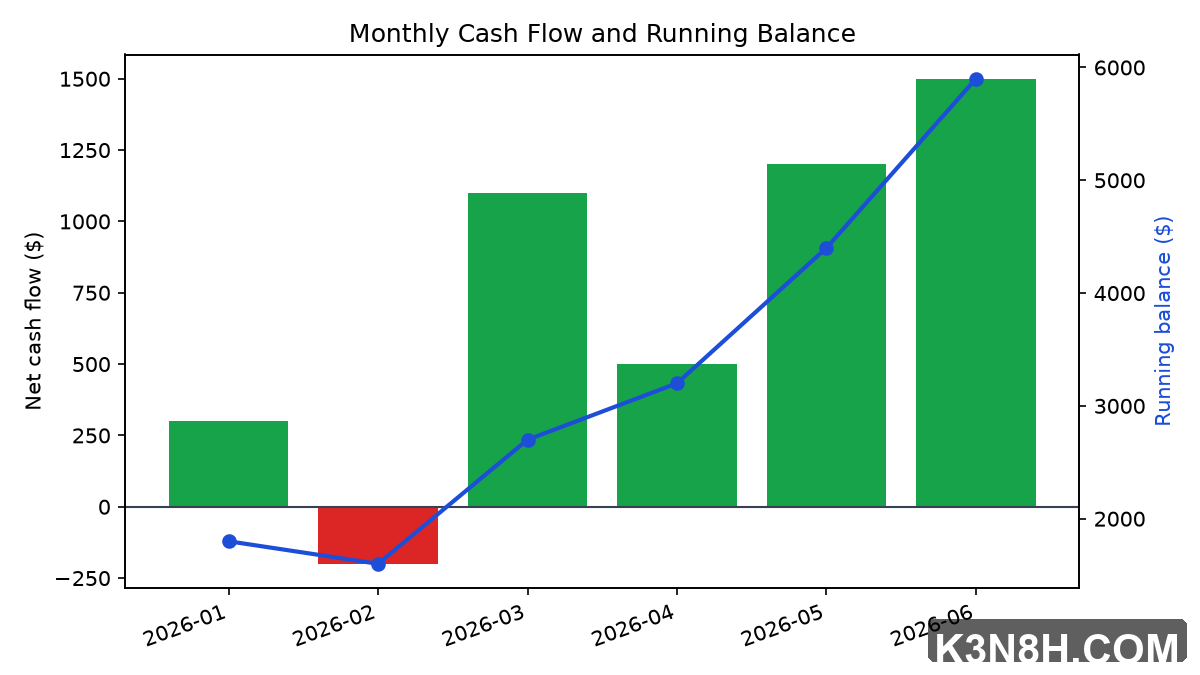
Monthly Cash Flow Tracker
Monthly income/expenses in, a running-balance chart and a negative-balance warning out.
Frequently asked questions
Do the browser utilities (Unit Converter, Password Toolkit, Text Toolkit) require an account or upload any data?
No. All three run entirely in your browser with no account, no sign-up, and nothing uploaded — you can use them immediately and, in most cases, offline once the page has loaded.
Is the Client Ops Tracker a replacement for a full CRM?
It's a replacement for a CRM only if your actual need is tracking clients, sessions, and invoices for a small practice — which is what its three linked tables cover. If you need sales pipeline stages, team permissions, or marketing automation, that's a genuinely different tool and this tracker isn't trying to be one.
How is the Monthly Cash Flow Tracker different from just using a spreadsheet?
You could build the same tracking in a blank spreadsheet, but the tool comes with the running-balance chart and negative-balance warning already built and working, plus realistic sample data showing how it should look once filled in — the value is in not having to build and debug the chart logic yourself.
What's the best first productivity tool for someone running a business entirely on their own?
Start with whichever browser utility matches your most frequent small annoyance (unit conversion, password generation, or checking whether your writing reads too dense), since those need zero setup. Once you're managing more than a couple of active clients, add the Client Ops Tracker or Session Notes Summarizer next.